Kiwix JS 4.4.0 is out — our first full release since 4.3.0 last November, so it rolls up about nine months of work.
Kiwix JS is the official browser-extension version of Kiwix. It’s a lightweight offline ZIM reader with great features that runs entirely inside Firefox, Chrome or Edge — point it at a ZIM file on your disk or USB stick and read Wikipedia, Gutenberg, TED and the rest with no Internet at all. Best of all, it’s right there in your browser, just one click away (if you pin the extension to the browser toolbar), with almost zero start-up latency.
Download and Install now
- Firefox Add-Ons Store
- Chrome Extension Store
- Edge Extension Store
- Ubuntu Touch — live
- No-install PWA version: https://browser-extension.kiwix.org/current/
- For more info see our GitHub repo
Great features
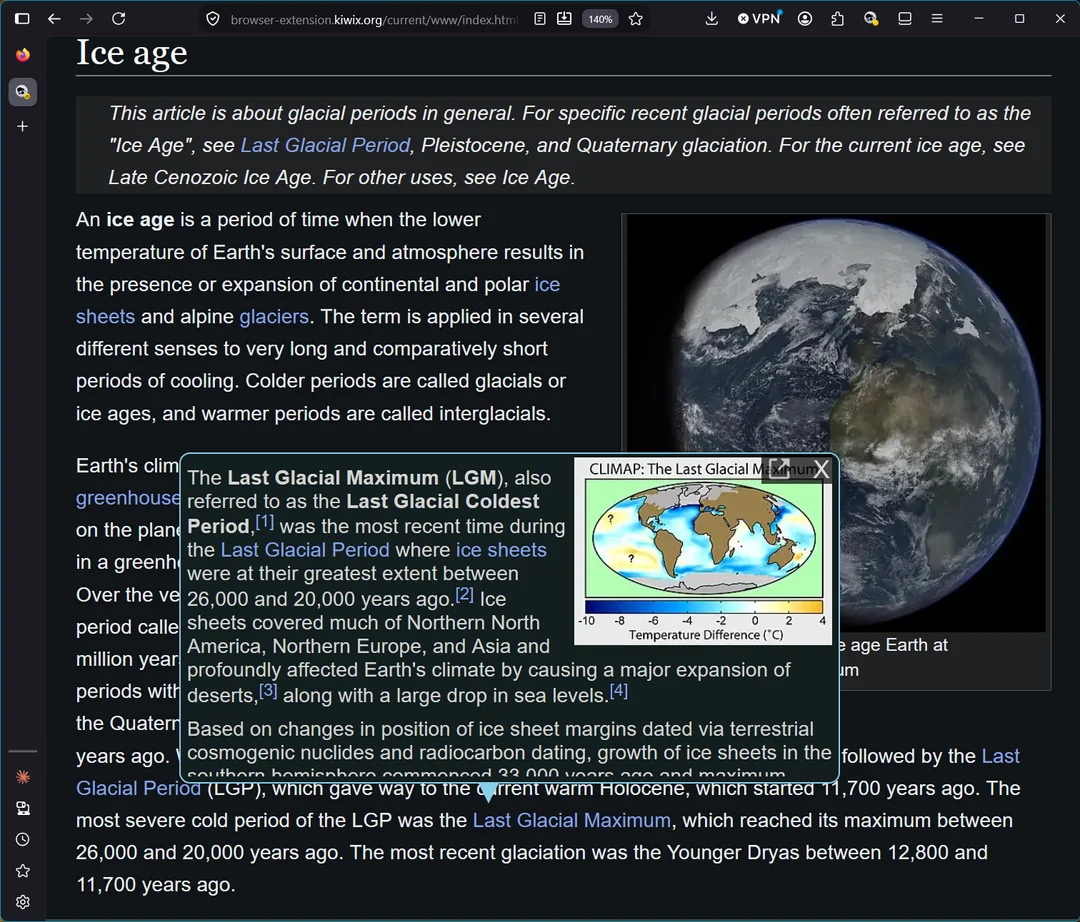
- Sumptuous dark mode, including support for Wikimedia native dark modes
- Popover previews of Wikipedia (and Wikivoyage) articles when hovering a link
- Slide-away navigation menus
- Full-text search
- Browser security with a restricted mode
- Extremely wide browser support, including very old browsers and systems – for advice on installing on older Chrome and others, go to our GitHub repo
- Fast and extremely lightweight
What has changed
Security hardening. Several fixes around settings that can be supplied in the app’s URL, and around archive source verification. Settings passed in the URL are no longer saved permanently, the content injection mode is now validated rather than taken on trust, and the prompt about an archive’s source now appears consistently. If you’re running the extension, do let it update.
Bug fixes
- The in-app Library no longer claims “all library servers are unreachable” on older browsers, and server checks time out instead of spinning forever
- Refreshed the emergency download-mirror list for when Kiwix servers are down
- App reset now properly clears the Cache and IndexedDB
- Fixed the Service Worker failing to find the remote PWA in Chromium extensions
- No more white flash on startup before the dark theme kicks in
Accessibility. A proper pass on screen-reader and keyboard support — correctly labelled controls, ARIA state that matches reality, and an automated accessibility check now running in CI so it stays fixed.
“Bypass AppCache” is now “Developer Mode”, which is what it always meant. It also behaves sanely across modes now, instead of blocking mode switches.
Under the hood
For the tinkerers: JQuery and Bootstrap’s JavaScript bundle are gone entirely — about 150KB less JavaScript to ship and parse — replaced with native equivalents that keep keyboard and ARIA behaviour intact. Notably this cost us no browser compatibility: even very old browsers like IE11 still work in Restricted mode, and we still test that in CI.
Full changelog ・ source (GPLv3). Bug reports and feedback very welcome on the GitHub issues tracker, or drop us a message here.